
Your First Impression Happens After the Sale
Most freelancers focus their energy on getting the client — the pitch, the proposal, the negotiation. But the experience that most shapes a client's long-term loyalty and likelihood to refer others is what happens immediately after they say yes.
The first 48 hours of a new client relationship set the tone for everything that follows. A smooth, professional onboarding experience — where the client receives clear next steps, knows exactly what to expect, and feels confident they made the right choice — creates a foundation of trust before you have delivered a single piece of work.
A chaotic or absent onboarding experience does the opposite. A new client left wondering what happens next, waiting for instructions that never clearly arrived, or receiving documents piecemeal over days is already questioning their decision. That doubt is hard to overcome, even when the actual work is excellent.
The good news is that a great onboarding experience does not require significant manual effort. With the right system built once, every new client goes through the same professional, consistent process automatically — and you spend your time delivering the work rather than managing the paperwork.
What Client Onboarding Actually Covers
Onboarding is everything that happens between a client saying yes and your first substantive working session together. Done well, it accomplishes several things simultaneously:
- Confirms the client's commitment: A signed contract and collected deposit transform a verbal agreement into a professional engagement.
- Sets expectations clearly: Both parties understand the scope, process, timeline, communication norms, and deliverables before work begins.
- Gathers the information you need: An intake questionnaire collects all relevant client background so your first session is productive from minute one.
- Creates a professional impression: A polished, organized onboarding experience signals that you run a serious business and can be trusted to deliver.
- Reduces friction in the working relationship: Clear processes and documented agreements prevent the ambiguity that leads to scope disputes, misaligned expectations, and difficult conversations later.
The 5-Step Automated Onboarding System
Here is a complete automated onboarding system that can be built once and run indefinitely with minimal ongoing effort. Each step is triggered automatically by the previous one, requiring no manual coordination on your part.
STEP 1: Booking and Payment
The client visits your booking page (Book Like A Boss), selects a service, chooses a time, and pays the deposit or full fee. The booking is confirmed automatically. This step filters serious clients from browsers — only those who have committed time and money move forward.
STEP 2: Automated Welcome Email
Immediately after booking and payment, an automated welcome email goes out. This email confirms the appointment, introduces what to expect, provides any preparation instructions, and sets the tone for the relationship. It is the client's first experience of your business post-booking.
STEP 3: Intake Questionnaire
Included in or following the welcome email is a link to your intake questionnaire. This collects the information you need to make the first session immediately valuable — goals, background, relevant context, and any specific questions or concerns. The client completes this in their own time before the appointment.
STEP 4: Contract or Agreement
For service relationships beyond a single session — packages, retainers, or project work — a contract is sent for electronic signature. This can be included in the welcome email or sent as a separate step. Tools like DocuSign, HelloSign, or HoneyBook handle electronic signatures simply.
STEP 5: Pre-Appointment Reminder With Prep Notes
Your automated reminder sequence (24-48 hours before and same-day) includes a brief note about what to have ready or think about before the session. This small addition significantly improves the quality of the first session by ensuring clients arrive prepared rather than cold.
All five steps can be configured once in your booking platform and email system. Once built, this sequence runs automatically for every new client — you do not need to manually send a single message.
The Welcome Email: Your Most Important Onboarding Asset
The automated welcome email is the centerpiece of your onboarding system. It is the first message a client receives after committing to work with you, and it sets the tone for the entire relationship. Getting it right is worth the investment of time.
What a Great Welcome Email Includes
- A warm, genuine opening: Express genuine enthusiasm about working with them. This does not need to be effusive — a simple, warm acknowledgment goes a long way.
- Confirmation of the appointment: Date, time, duration, and video link or location. Everything they need in one place.
- What to expect: A brief overview of how the session will be structured, what you will cover, and what the client should bring or prepare.
- The intake questionnaire link: A direct link with a brief explanation of why you are asking for this information and how it will be used.
- How to reach you: Your preferred communication channel and response time expectations. Set these clearly from the start.
- A rescheduling link: Make it easy for clients to reschedule if they need to — this reduces no-shows and last-minute cancellations.
WELCOME EMAIL TEMPLATE
Subject: Welcome — Your [Service Name] appointment is confirmed
Hi [Name],Welcome, and thank you for booking — I am really looking forward to working with you.Your [Service Name] is confirmed for [Date] at [Time]. Here is your [Zoom/Meet] link: [link]Before our session, I would love to know a bit more about you and what you are hoping to get from our work together. Please take 5 minutes to complete this short questionnaire: [intake form link]This helps me prepare so that we can make the most of our time together from the very first session.If you need to reschedule for any reason, you can do so here: [rescheduling link]. Please give at least 24 hours notice where possible.Looking forward to speaking with you on [Date].[Your Name][Your contact details]
Building Your Intake Questionnaire
The intake questionnaire is one of the most underused tools in freelance onboarding. When done well, it transforms the first session from a information-gathering exercise into immediately productive work — and it signals to clients that you are thorough and professional.
What to Include (Adapt to Your Service Type)
- What are you hoping to achieve from our work together? (Goals and outcomes)
- What is your biggest challenge or pain point right now? (Problem statement)
- What have you already tried? What worked and what did not? (Context)
- Is there anything I should know about your situation, background, or constraints? (Relevant context)
- What does success look like for you at the end of our engagement? (Definition of success)
- Do you have any specific questions or concerns before we start? (Open channel)
Keep your questionnaire to 5 to 8 questions. Longer questionnaires see lower completion rates and can feel like homework rather than helpful preparation. Every question should have a clear reason for being there — if you would not use the answer, remove the question.
Tools for Intake Forms
- Google Forms — free, simple, and integrates with Google Sheets for easy review
- Typeform — polished and client-friendly, with a free tier sufficient for most freelancers
- Book Like A Boss — supports intake questions built directly into the booking flow, so clients complete them as part of booking rather than as a separate step
Building intake questions directly into your booking flow — as Book Like A Boss supports — is the highest-completion approach. Clients answer the questions in the moment of booking when their engagement is highest, rather than receiving them later as a separate task to return to.
Contracts and Agreements: Making It Official
For any engagement beyond a single session, a written agreement protects both parties and professionalizes the relationship. The contract does not need to be long or complex — a clear, plain-language agreement that covers the essentials is far more useful than a dense legal document that neither party fully reads.
What Your Service Agreement Should Cover
- Scope of services — what is included and explicitly what is not
- Payment terms — amounts, due dates, deposit policy, and late payment consequences
- Session cancellation and rescheduling policy
- Confidentiality expectations
- How the engagement ends — notice period for either party to end the arrangement
- Intellectual property ownership where relevant
Electronic Signature Tools
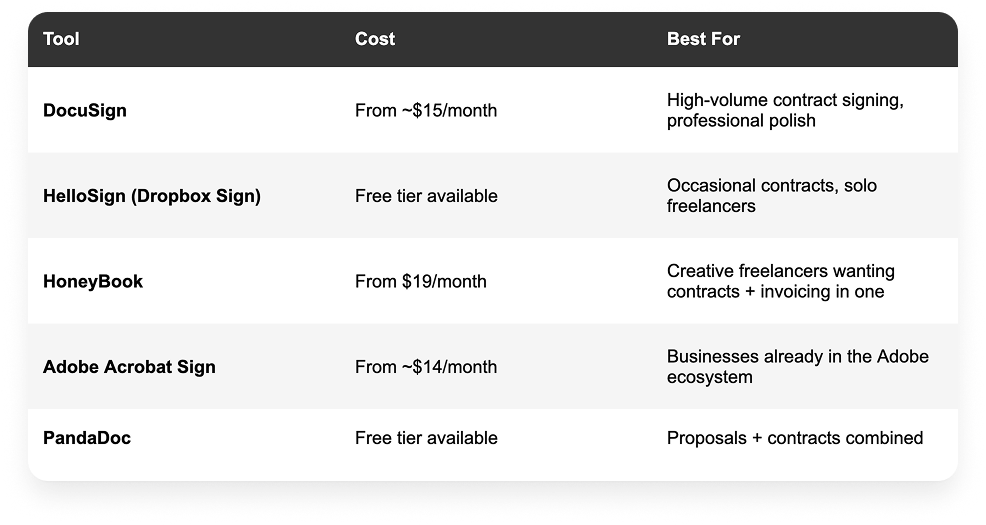
For most solo freelancers, a free or low-cost electronic signature tool combined with a well-written template contract is entirely sufficient. The contract itself is more important than the tool used to sign it — invest your time in getting the terms right, not in finding the most sophisticated signing platform.
The Client Welcome Pack: An Optional But Powerful Addition
Some freelancers supplement their automated onboarding sequence with a client welcome pack — a short document or page that covers everything a new client needs to know about working with you. This is particularly valuable for ongoing or retainer relationships where the client will interact with you repeatedly over time.
What a Welcome Pack Might Include
- A brief introduction to how you work and what clients can expect
- Your communication preferences and response time commitments
- How to prepare for sessions and what to bring or have ready
- How to reschedule or cancel appointments
- How to access recordings, notes, or deliverables from sessions
- Your cancellation and refund policy
- FAQ — answers to questions new clients commonly ask
A welcome pack can be a PDF document, a Notion page, or even a dedicated section of your website. The format matters less than the clarity of the content. Many freelancers find that a well-crafted welcome pack dramatically reduces the volume of administrative questions they receive from new clients — because the answers are already provided.
Measuring Your Onboarding: What Good Looks Like
Once your onboarding system is running, a few simple metrics tell you whether it is working:
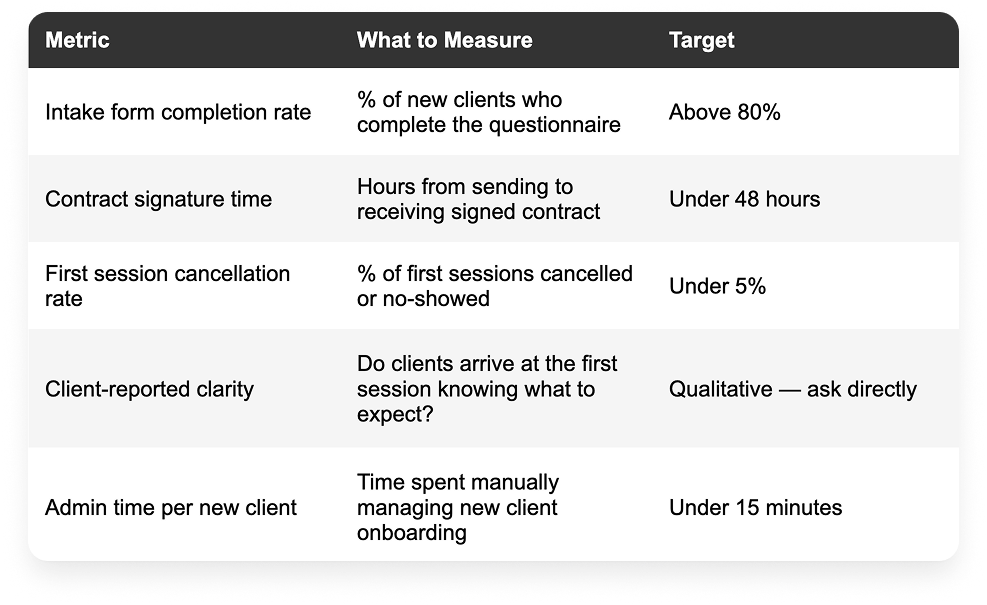
If intake form completion is low, the form may be too long or the link too buried in your welcome email. If first session cancellations are high, your deposit policy may need strengthening. If admin time is high, there are likely manual steps in your process that can be automated.
Frequently Asked Questions
What should be included in a freelancer client onboarding process?
A complete onboarding process includes: confirmation of the booking and payment, a welcome email with next steps, an intake questionnaire to gather client information, a contract or service agreement for ongoing engagements, and automated appointment reminders leading up to the first session. All of these can be automated through a combination of a booking platform like Book Like A Boss, an intake form tool, and an electronic signature tool.
How do I onboard clients without spending hours on admin?
Build your onboarding sequence once using automated tools. A booking platform handles confirmation and payment collection. A pre-configured welcome email template sends automatically after booking. An intake form link is included in that email. A contract template is sent via an electronic signature tool. Appointment reminders go out automatically. Once this sequence is set up, each new client moves through it with under 15 minutes of manual time on your part.
What questions should I ask new clients in my intake form?
Focus on goals, challenges, context, and expectations. The most valuable questions are: What are you hoping to achieve? What is your biggest challenge right now? What have you already tried? What does success look like? Is there anything important I should know? Keep the form to 5 to 8 questions — short enough to complete easily, specific enough to be genuinely useful.
Do freelancers need a contract for every client?
For any engagement beyond a single, fully pre-paid session, yes. A written agreement that specifies scope, payment terms, and cancellation policy protects both parties and prevents the ambiguity that leads to disputes. For ongoing retainers, packages, or project-based work, a contract is essential. For single sessions collected at the time of booking with a clear refund policy stated on the booking page, a formal contract may not be necessary — but one is still recommended for anything above a certain value threshold.
What is the best way to send a contract to a new client?
Electronic signature tools are the most efficient and professional approach. DocuSign and HelloSign are widely used and trusted. The client receives an email with a link to sign digitally — no printing, scanning, or mailing required. Most clients can sign in under 5 minutes. Store signed contracts in a dedicated folder in your cloud storage so they are easy to reference if a question arises later.