What a Client Portal Actually Does for Your Business
A client portal is a dedicated online space where clients can access everything related to their engagement with you — session recordings, shared documents, booking links, invoices, notes, resources, and communication — without needing to email you for every individual item.
For many freelancers, the absence of a client portal means that every deliverable, resource, and piece of information gets sent via email. The client's inbox becomes their default filing system for everything related to your work together. When they need to find something — the contract they signed, the recording of session three, the worksheet you shared last month — they are searching through an email thread rather than opening a clean, organized space.
A well-designed client portal solves this in both directions. Clients have a single, organized place to find everything. You spend less time resending materials and answering 'where was that document you sent?' questions. The engagement feels more professional and structured, which tends to translate into better client outcomes and higher retention.
The good news: setting up a functional client portal does not require a developer, a custom website, or significant technical expertise. Several accessible tools make it possible to create a professional portal in a few hours using software you may already be paying for. This article covers the options and the setup process.
What to Include in a Client Portal
The right content for a client portal depends on your service type and how you work with clients. Here are the most commonly included elements:
- Booking link: A direct link to your booking page so clients can schedule or reschedule sessions without contacting you. This alone reduces a significant number of routine messages.
- Session recordings: For services delivered via video call, recordings stored and organized by session so clients can review them at any time.
- Shared documents and resources: Worksheets, templates, guides, frameworks, or any material shared as part of your service — organized and accessible in one place.
- Session notes or summaries: A brief summary of each session — what was covered, key insights, and action items — stored in a consistent format.
- The service agreement or contract: The signed agreement accessible to both parties without anyone needing to dig through old emails.
- Invoice and payment history: For clients on packages or retainers, a record of payments made and any outstanding balance.
- FAQ and working guidelines: Answers to common questions, communication preferences, and any housekeeping information about how you work.
Not every portal needs all of these. Start with the elements that reduce the most email back-and-forth for your specific client relationships, then expand over time.
Option 1: Notion — The Most Flexible Free Option
Notion is a document and database tool that many freelancers already use for their own organization. Its sharing features make it a capable and free client portal solution, particularly for freelancers who work in a knowledge-based or content-heavy service.
How to Set Up a Notion Client Portal
- Create a new Notion page titled with the client's name
- Add subpages or sections for: Session Notes, Resources, Booking Link, Contract, and FAQ
- Add your content — documents, links, notes — to each section
- Share the page with the client via the 'Share' menu, setting permissions to 'Can view' (or 'Can comment' if you want them to be able to leave notes)
- Send the client their portal link in your onboarding email
What Notion Does Well
- Completely free for most use cases
- Highly flexible — you can structure the portal exactly as you want it
- Clean, professional appearance that clients find easy to navigate
- Easy to update — add session notes after each appointment in minutes
- No account required for clients to view a shared page
What Notion Does Less Well
- Not purpose-built as a client portal — requires manual setup for each client
- No built-in payment processing or booking integration
- Managing many individual client portals can become complex as volume grows
- No client login — the shared link can be forwarded by the client to others
Notion is the best zero-cost starting point for freelancers who want a clean, organized client portal without any monthly subscription. It takes about 30 minutes to set up a template and 5 minutes to duplicate it for each new client.
Option 2: Book Like A Boss — The Booking-Integrated Portal
Book Like A Boss goes beyond scheduling to provide a complete service showcase and client-facing page. While not a traditional document-sharing portal, BLAB's booking page serves as the primary client-facing hub — the place where new and returning clients book sessions, see service details, read testimonials, and access your scheduling.
What BLAB Provides as a Client Hub
- Public booking page: A professional, branded page that clients bookmark and return to for all scheduling. All services in one place, bookable and payable with no involvement from you.
- Automated confirmation with rescheduling links: Every confirmation email includes a rescheduling link, so clients can manage their own appointments independently.
- Intake form responses: Client intake information captured at booking is stored in your BLAB dashboard and accessible for reference before each session.
- Booking history: A record of all appointments with each client, accessible in your BLAB account.
For appointment-based service providers, BLAB's booking page typically functions as the primary external-facing hub. Pair it with a Notion portal for document sharing and session notes, and you have a complete client experience without any developer work.
Option 3: Dedicated Client Portal Tools
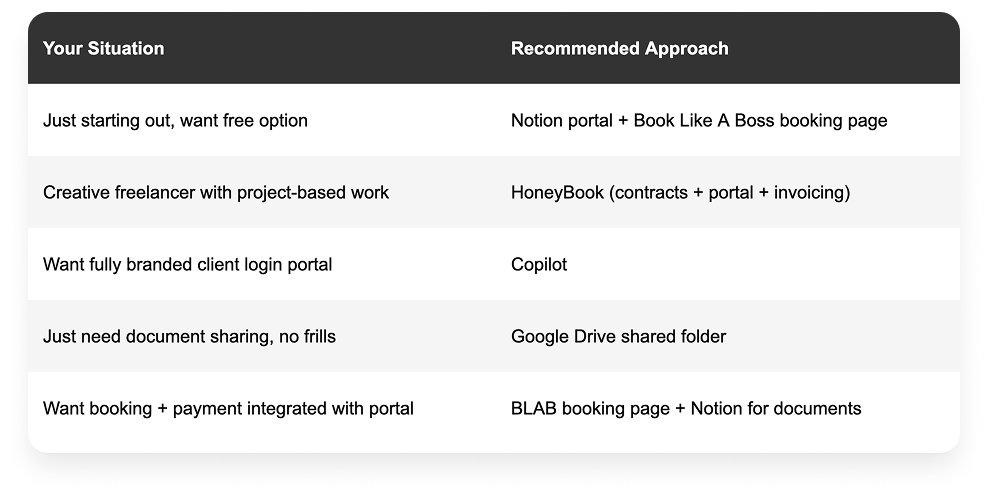
HoneyBook
Client portal built into an all-in-one business management suite
Strengths: Full client portal with invoice access, contract signing, project timelines, and file sharing. Clients log in with a dedicated account. Professional appearance. Strong for creative and project-based freelancers.
Limitations: Higher cost than standalone tools. Transaction fees on payments. More than needed if you only want a simple document portal.
Price: From $19/month.
Best for: Photographers, event planners, designers, and creative freelancers who want contracts, invoicing, and a client portal in one platform.
Copilot
Purpose-built client portal tool for service businesses
Strengths: Specifically designed as a client portal. Clean, professional interface. Clients log in to access messages, files, contracts, invoices, and forms. White-labeled — your branding, not Copilot's. Good integrations.
Limitations: Monthly subscription required. More infrastructure than many solo freelancers need at early stages.
Price: From $29/month.
Best for: Consultants, coaches, and service providers who want a fully branded client portal with login access and a professional polished experience.
Google Drive (Shared Folder)
Free, familiar, and practical for document sharing
Strengths: Free for most use cases. Clients almost certainly already have Google accounts. Simple to set up and organize. Easy to share specific files or entire folders with view or comment access.
Limitations: Not purpose-built as a portal — appearance is functional rather than professional. No booking integration. No messaging. Better as a document repository than a full portal.
Price: Free (Google account required).
Best for: Freelancers who need a simple, free way to share documents with clients and are not concerned with the aesthetic of the portal experience.
Building a Simple Portal: Step-by-Step With Notion
For most solo freelancers starting out, Notion provides the best combination of capability, flexibility, and cost (free). Here is a step-by-step setup process:
Step 1: Create Your Portal Template (30 minutes)
Build a master template page in Notion that you will duplicate for each new client. Include the following sections:
- Welcome — a brief personalized introduction to the portal
- Your Booking Link — a direct link to your BLAB booking page
- Resources — a section for worksheets, guides, and materials
- Session Notes — a dated log of session summaries
- Documents — your service agreement and any formal documents
- FAQ — answers to common client questions
Step 2: Duplicate for Each New Client (5 minutes)
When a new client books, duplicate your template page, rename it with the client's name, and personalize the welcome section. This takes 5 minutes and creates their dedicated portal space.
Step 3: Share With the Client
In Notion, click Share on the client's page and set it to 'Anyone with the link can view.' Copy the link and include it in your welcome email: 'I have created a dedicated portal for our work together — you can access it here at any time.'
Step 4: Maintain It After Each Session
After each session, spend 5 minutes adding a brief session note to their portal (date, key points, action items) and uploading any resources shared. This habit keeps the portal current without significant ongoing effort.
Choosing the Right Portal Approach for Your Business
Frequently Asked Questions
Do freelancers need a client portal?
Not necessarily from day one, but a client portal becomes increasingly valuable as your client roster grows and the volume of shared materials increases. The signal that you need one: clients are regularly emailing you asking where to find something, or you are spending more than 30 minutes per month resending materials and answering questions that a well-organized portal would handle automatically.
What is the best free client portal for freelancers?
Notion is the most capable free option for most freelancers. It allows you to create a clean, organized, shareable page for each client that can include booking links, session notes, shared documents, and FAQ sections. Setup takes about 30 minutes for the template and 5 minutes per new client. Google Drive shared folders are a simpler free alternative if document storage is the primary need.
Can I use Book Like A Boss as a client portal?
BLAB functions as your client-facing booking hub — the page where clients book, pay, and access scheduling. It is not a document-sharing portal, but it is the most important piece of the client-facing infrastructure for appointment-based service providers. Pair it with Notion for document sharing and session notes, and you have a functional, professional client portal without any additional monthly cost.
How do I share a client portal without requiring a login?
Notion shared pages do not require client login — they are accessible to anyone with the link. Google Drive files can be shared with 'anyone with the link can view' settings. If you want clients to have a dedicated login for security and personalization, tools like Copilot or HoneyBook provide this — but for most solo freelancers, a shareable link is sufficient and removes friction.
How long does it take to set up a client portal?
A functional Notion-based client portal template can be built in 30 to 60 minutes. Duplicating it for a new client takes 5 minutes. A more sophisticated setup using HoneyBook or Copilot might take 2 to 4 hours to configure fully. The investment is small relative to the ongoing time saved in reduced email back-and-forth and improved client experience.