
The Tool Trap
There is a particular kind of productivity paralysis that strikes freelancers in their first few years: the endless search for the perfect tool. You sign up for a project management platform, then switch to another one that looks cleaner. You try three different invoicing apps. You download a time-tracking tool you never actually open. You pay for four different subscriptions that overlap in functionality, each solving part of a problem that one well-chosen tool could solve entirely.
By the time you audit what you are actually paying for and using, the number is often surprising. Freelancers regularly discover they are spending $200 to $400 per month on software — much of it redundant, some of it unused — without a clear sense of whether any of it is actually making their business run better.
This article is a corrective to that pattern. It defines the lean tech stack that most freelancers and solo service providers actually need in 2026: the categories of tools that matter, one clear recommendation in each category, and a realistic monthly cost. The goal is not to have every tool — it is to have the right ones, working together, without overspending or overcomplicating.
The total cost of the stack described here lands under $100 per month for most solo operators. The total time saved compared to running a freelance business without these tools is measured in hours per week.
The 7 Categories Every Freelancer Needs to Cover
A functional freelance tech stack needs to address seven operational areas. These are not optional extras — they are the core functions of any professional service business. If any one of them is handled manually or handled poorly, it costs you time, money, or client confidence.
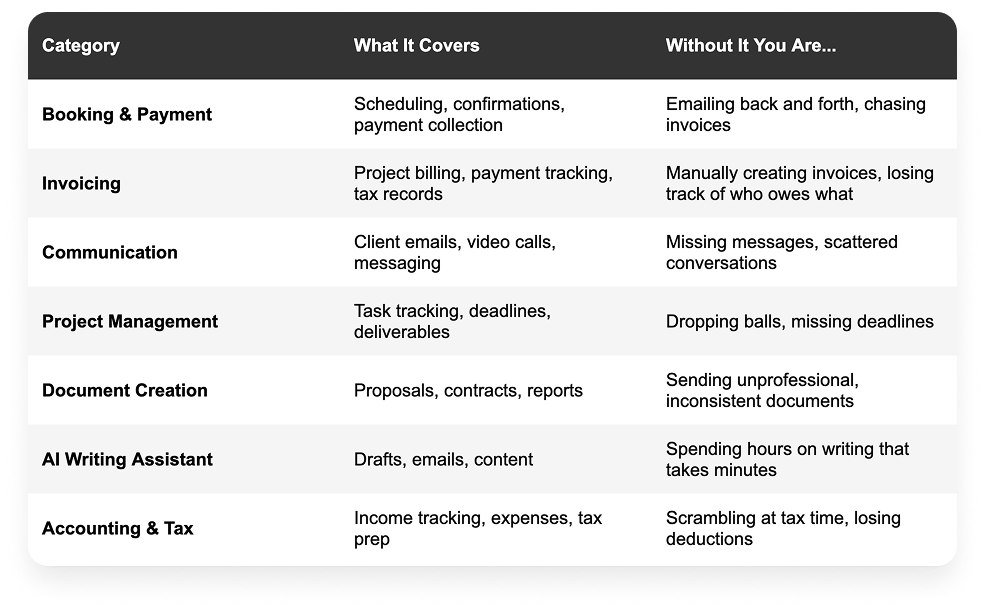
Each category below includes a recommended tool, its approximate cost, and why it earns its place in a lean stack.
The Stack
1. Booking & Payment — Book Like A Boss
BOOKING & PAYMENT
Book Like A Boss | From ~$9/month
A fully branded booking page that lets clients schedule appointments and pay in a single flow. Supports individual sessions, group bookings, packages, deposits, and full upfront payment. Integrates with Stripe, PayPal, and Square. Charges zero transaction fees on top of standard processor rates.
Why it matters: This is the foundation of a freelance business that runs itself. When clients can book and pay without your manual involvement, scheduling coordination and invoice chasing both disappear.
For service providers and freelancers who charge per appointment or session, the booking and payment layer is the most important tool in the stack. Everything else builds on top of a system where clients can find you, book you, and pay you without friction.
Book Like A Boss earns the top slot in this stack because it goes beyond scheduling. Your BLAB page is a branded, professional showcase for your services — displaying your offerings, pricing, bio, testimonials, photos, and booking calendar in one place. Many freelancers find their BLAB page effectively replaces the need for a separate website, particularly when they are just starting out.
What It Handles
- Real-time availability and self-service booking
- Payment collection at time of booking — deposits or full payment
- Automated booking confirmations and appointment reminders
- Multiple service types and booking pages
- Calendar sync with Google, Outlook, and iCal
- Embeds into your existing website if you have one
- Zero transaction fees — you only pay your payment processor's standard rate
What You Can Drop
Once you have BLAB set up properly, you can eliminate: manual scheduling emails, calendar back-and-forth, post-appointment invoicing for session-based work, and manual reminder messages before appointments. That is typically several hours of admin work per week, gone.
Start here. Before setting up anything else in your tech stack, get your booking and payment system running. It is the highest-leverage tool in the stack and sets the professional tone for every client interaction that follows.
2. Invoicing — Wave (Free) or FreshBooks (~$17/month)
INVOICING & BILLING
Wave (free) or FreshBooks | Free — $17/month
Professional invoice creation, delivery, and tracking. Automated payment reminders. Accepts online payments. Tracks which invoices are paid, outstanding, or overdue. Integrates with your bank for automatic transaction matching.
Why it matters: For project-based billing that is not handled at booking time, a proper invoicing tool ensures you get paid faster, look more professional, and never lose track of what is owed.
If you use Book Like A Boss to collect payment at the time of booking for your appointments, your invoicing needs will be reduced significantly. But most freelancers still have some project-based billing — retainer clients, deliverable-based projects, or consulting engagements where milestone invoices make more sense than upfront payment.
Wave is a strong free option for freelancers who need basic invoicing and accounting. FreshBooks adds automated reminders, time tracking, and more polished client-facing documents for a modest monthly fee. Either is significantly better than manually creating invoices in a Word document or spreadsheet.
Key Features to Use
- Automated payment reminders at defined intervals — configure this immediately
- Direct payment links in every invoice
- Recurring invoices for retainer clients
- Invoice templates that match your branding
3. Communication — Gmail + Google Meet (Free) or Zoom (~$15/month)
COMMUNICATION
Gmail + Google Meet / Zoom | Free — $15/month
Professional email with a custom domain, video calling for client meetings, and calendar integration. The combination of Gmail and Google Meet covers most freelancers' communication needs entirely within the free Google Workspace tier.
Why it matters: Clients form impressions from your email address. A Gmail with your own domain signals professionalism. A reliable video call setup signals reliability.
Communication tools may feel like table stakes, but the specific choices matter. A professional email address at your own domain — [email protected] rather than [email protected] — signals that you run a real business. Google Workspace provides this, along with Google Meet for video calls and Google Calendar for scheduling, for a very reasonable monthly fee.
If your client base prefers Zoom — which remains the dominant video platform in many industries — a Zoom Pro plan is worth the cost for the reliability and polish it provides. Book Like A Boss integrates with both Zoom and Google Meet, so virtual appointment links are generated and included in booking confirmations automatically.
What to Prioritize
- A custom domain email address — this is non-negotiable for professional positioning
- Two-way calendar sync so your booking tool always reflects your real availability
- A reliable video platform your clients already use
4. Project Management — Notion (Free) or Trello (Free)
PROJECT MANAGEMENT
Notion or Trello | Free tiers sufficient for most solo freelancers
A central place to track all active projects, tasks, deadlines, and deliverables. Keeps everything visible in one place so nothing falls through the cracks.
Why it matters: Without a system, project details live in your head, your inbox, and a dozen different documents. A simple project management tool brings everything into one place.
Project management tools have a reputation for being complicated and over-engineered. For solo freelancers, they do not need to be. The goal is simple: a single place where you can see all your active projects, their current status, and any outstanding tasks or deadlines.
Notion works well for freelancers who want a flexible workspace that can also handle notes, client information, and documentation alongside project tracking. Trello works well for those who prefer a visual board approach. Both have free tiers that are genuinely sufficient for solo operators.
The key is to actually use it. A project management tool that is not kept up to date is worse than no tool at all — it creates false confidence that everything is tracked when it is not.
A Simple Setup That Works
- One board or database per active client or project
- Columns or statuses for: Not Started, In Progress, Waiting on Client, Complete
- A weekly review habit — 15 minutes every Monday morning to update status and identify what needs attention
5. Document Creation — Google Docs (Free) or Microsoft 365 (~$10/month)
DOCUMENT CREATION
Google Docs or Microsoft 365 | Free — $10/month
Create, store, and share proposals, contracts, briefs, reports, and any other client-facing documents. Cloud storage means documents are accessible from any device and can be shared with clients via link.
Why it matters: Professional documents build client confidence. Cloud storage means you never lose a document and can access everything from anywhere.
Most freelancers already use Google Docs or Microsoft Word. The recommendation here is less about switching tools and more about using them intentionally: build a library of templates for your recurring documents — proposals, contracts, project briefs, status updates, end-of-project reports — so you never start from a blank page.
AI writing tools have made this even easier. You can now generate a solid first draft of any of these documents in minutes, then customize it for the specific client and project. The combination of a good template library and an AI writing assistant cuts document creation time by 60 to 80 percent.
6. AI Writing Assistant — ChatGPT or Claude (~$20/month)
AI WRITING ASSISTANT
ChatGPT Plus or Claude Pro | ~$20/month
Draft emails, proposals, contracts, social media posts, blog content, client reports, and any other written communication faster and to a higher standard than writing from scratch.
Why it matters: Writing is one of the most time-consuming tasks in a freelance business. An AI writing assistant handles the first draft of almost everything, cutting hours of admin work to minutes.
An AI writing assistant is now as essential to a freelance tech stack as email. The use cases are broad: drafting client emails, writing proposals, creating social media content, generating first drafts of blog posts, summarizing documents, and producing any other written content your business requires.
The key to getting value from these tools is learning to prompt them effectively. Rather than asking for generic content, give the AI specific context: who the client is, what tone you want, what the document needs to accomplish, and any specific details to include. The output improves dramatically with good input.
High-Value Use Cases for Freelancers
- Drafting initial responses to new client inquiries in under 2 minutes
- Writing proposals from a brief — first draft in 10 minutes instead of 2 hours
- Generating follow-up emails after client calls based on your notes
- Creating social media content batches — a week of posts in 30 minutes
- Drafting difficult client communications like scope change requests or rate increases
7. Accounting & Tax — Wave (Free) or QuickBooks Self-Employed (~$15/month)
ACCOUNTING & TAX
Wave or QuickBooks Self-Employed | Free — $15/month
Track income and expenses, categorize transactions, generate profit and loss reports, and prepare for tax season without scrambling through bank statements in April.
Why it matters: Good financial records save money at tax time through deductions you would otherwise miss, and they give you a clear picture of your business health throughout the year.
Many freelancers manage their finances in a spreadsheet or, worse, not at all until tax time. This creates two problems: you lose track of deductible expenses throughout the year, and you spend significant time and stress pulling everything together at tax time.
A basic accounting tool eliminates both problems. Wave is a genuinely good free option that handles income and expense tracking, invoicing, and basic reporting. QuickBooks Self-Employed adds automatic mileage tracking and quarterly estimated tax calculations for freelancers whose income fluctuates.
The Minimum to Set Up
- Connect your business bank account and credit card for automatic transaction import
- Set up expense categories that match your deductible expense types
- Review and categorize transactions once per week — a 15-minute habit that prevents a 6-hour year-end scramble
- Run a profit and loss report at the end of each month to track how your business is actually performing
The Full Stack at a Glance
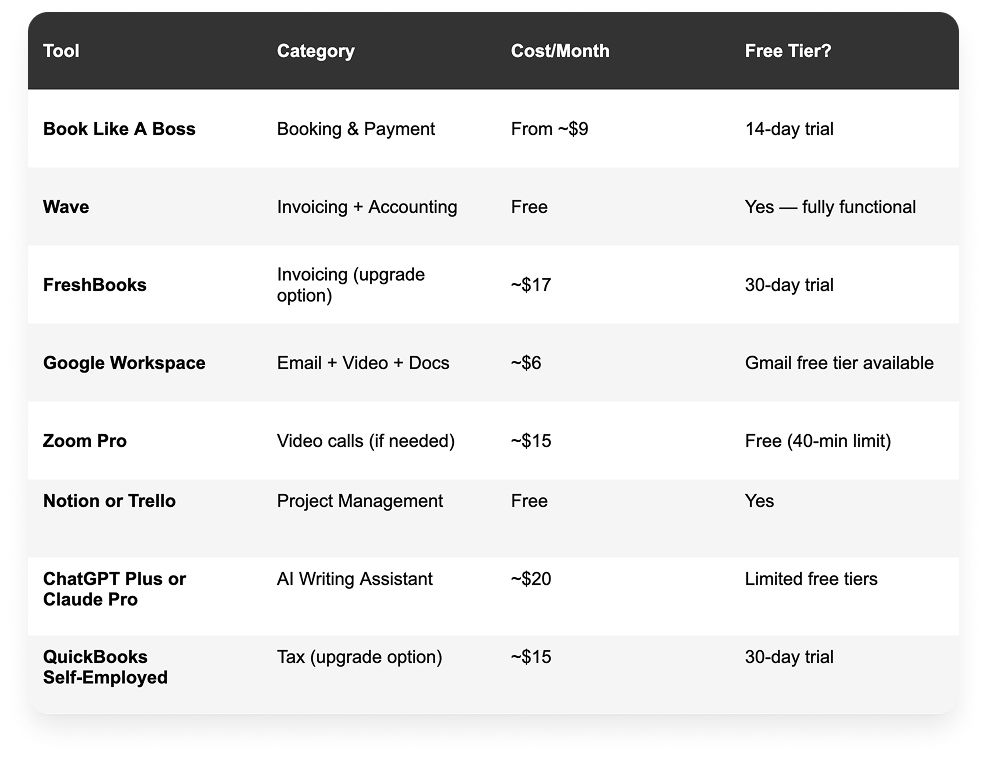
Total monthly cost running the full stack: approximately $50 to $90 per month depending on which options you choose. Most freelancers can start with the free tiers of several tools and upgrade only when the features justify the cost.
What the Stack Does Not Include — And Why
You will notice this stack does not include several tools that frequently appear in freelancer tech stack articles. Here is why they did not make the cut:
- A separate CRM: For most solo freelancers, a CRM is overkill. Your booking platform, email client, and a simple spreadsheet handle client tracking adequately until you have enough volume to justify a dedicated CRM.
- Social media scheduling tools: Many freelancers pay for scheduling platforms they use inconsistently. Until you have a consistent content creation habit, a scheduling tool is premature. Use your AI writing assistant to create content and post it manually until volume justifies automation.
- Time tracking software: If you bill by the hour, yes — add a time tracker. If you bill by project or by appointment, time tracking adds complexity without benefit.
- A separate website builder: Many new freelancers do not need a full website immediately. A well-built Book Like A Boss page handles your service showcase, booking, and payment collection and can serve as your primary web presence until your business grows to a point where a full website adds meaningful value.
How to Build Your Stack Without Overwhelm
Do not try to implement all seven tools in one week. Set up one tool at a time, get comfortable using it, and then add the next. Here is a suggested sequence:
Week 1 — Booking and payment: Set up Book Like A Boss. Configure your services, availability, and payment settings. Share your booking link everywhere. This single tool delivers the most immediate impact.
Week 2 — Invoicing and accounting: Set up Wave or FreshBooks. Connect your bank account. Create your invoice template. Configure automated payment reminders.
Week 3 — Communications: Get a custom domain email if you do not have one. Configure your video call platform. Make sure your calendar syncs with your booking tool.
Week 4 — AI writing and project management: Start using an AI writing tool for your next proposal or client email. Set up a simple project board in Notion or Trello. These tools add value immediately and require minimal setup.
The goal is not a perfect tech stack — it is a functional one you actually use. Five tools you use consistently will do more for your business than twelve tools that are half-configured and rarely opened.
Frequently Asked Questions
What tools do freelancers actually need?
At a minimum: a booking and payment tool, a way to send professional invoices, a professional email address, and a way to track your income for tax purposes. Everything else — project management, AI writing tools, video platforms — adds value but is not essential from day one. Book Like A Boss covers booking and payment, Wave covers invoicing and accounting for free, and Gmail covers professional email. That three-tool foundation can run a competent freelance business.
How much should a freelancer spend on software?
As a general guideline, software costs for a solo freelancer should sit between one and three percent of monthly revenue. If you are billing $5,000 per month, spending $50 to $150 on your tech stack is reasonable. If you are spending more than that, audit what you are actually using and cancel anything that is not delivering clear value.
Do freelancers need a website or is a booking page enough?
For many freelancers — particularly those who are just starting out or who get most of their business through referrals and social media — a polished Book Like A Boss page is sufficient. It showcases your services, displays social proof through testimonials, allows clients to book and pay, and can be shared as a link from anywhere. A full website becomes worth the investment when you are actively pursuing SEO-driven organic traffic or when your service offering is complex enough to require extensive explanation.
What is the best free invoicing tool for freelancers?
Wave is the strongest free invoicing option available in 2026. It handles invoice creation, delivery, and tracking, accepts online payments, and includes basic accounting functionality — all without a monthly fee. The free tier is genuinely functional, not artificially limited to push you toward a paid plan.
Is an AI writing tool worth paying for as a freelancer?
For most freelancers, yes. At roughly twenty dollars per month, a paid AI writing assistant like ChatGPT Plus or Claude Pro recovers its cost in the first proposal it helps you write. The paid tiers offer access to more capable models, higher usage limits, and features like document analysis that are genuinely useful for client work. Start with a free tier to get a feel for the tool, then upgrade once you have identified the use cases where it saves you the most time.
Should I use separate tools for scheduling and payment, or an all-in-one?
For service providers who charge per appointment, an all-in-one tool that handles both scheduling and payment is significantly better than two separate tools. The reason is friction: every additional step between a client deciding to book and completing payment reduces conversion and increases no-shows. Book Like A Boss handles both in a single, seamless flow — which is why it anchors this stack.