The Hidden Cost of No-Shows
A no-show is not just a missed appointment. It is a blocked time slot that cannot be filled at the last minute, a gap in your day that generates zero revenue, and often the ripple effect of rescheduling that follows. For service providers who charge per appointment — coaches, consultants, therapists, trainers, photographers, and dozens of other professionals — no-shows are one of the most direct and painful ways that income disappears.
The numbers add up fast. If you see 20 clients per week and your no-show rate is 10 percent, that is two missed appointments per week. At even a modest session rate of $75, that is $150 per week — over $7,500 per year — in revenue that simply evaporated because someone forgot or did not bother to cancel.
The frustrating part is that most no-shows are preventable. Research on appointment-based businesses consistently shows that the majority of no-shows are not intentional. Clients forget. Life gets in the way. The appointment slips their mind between the day they booked it and the day it was scheduled to happen. A well-timed reminder — automated, requiring no effort on your part — is often all it takes to bring that client back to the calendar.
This article covers everything you need to know about setting up an automated reminder system that dramatically reduces your no-show rate: what the research says about reminder timing and channels, the exact sequences to set up, how to pair reminders with deposit collection for maximum protection, and the specific tools that handle all of it automatically.
Why Clients No-Show: The Psychology
Understanding why no-shows happen makes it easier to design systems that prevent them. No-shows generally fall into three categories:
- Genuine forgetting: The most common cause. The client booked a week or two in advance, life got busy, and the appointment simply did not stay top of mind. This is entirely preventable with reminders.
- Low commitment: When a booking is free or requires no upfront payment, the psychological cost of not showing up is very low. Clients who have paid a deposit or the full session fee have a financial reason to show up — or at least to cancel in advance so they can reschedule rather than forfeit their payment.
- Last-minute conflict: Something came up. This is the most legitimate reason and the hardest to prevent entirely — but an early reminder gives clients the opportunity to reschedule proactively, which is much better than a silent no-show.
The solution to the first cause is reminders. The solution to the second is deposits and prepayment. The solution to the third is an easy rescheduling mechanism. A well-designed booking system addresses all three.
The Science of Reminder Timing
Not all reminders are equally effective. The timing, channel, and content of each reminder significantly affects whether it actually changes client behavior.
What the Research Shows
- A reminder sent 24 to 48 hours before an appointment is the single highest-impact touchpoint. It hits close enough to the appointment to create immediacy, while still giving the client time to reschedule if they have a conflict.
- A second reminder sent 1 to 2 hours before the appointment catches clients who missed the earlier one and gives a final nudge to those who are on the fence.
- A confirmation message sent immediately after booking sets the expectation and gives the client all the information they need — date, time, location or video link, what to prepare.
- SMS reminders have significantly higher open rates than email reminders. Studies of appointment-based businesses report SMS open rates above 90 percent, compared to 20 to 30 percent for email. For the 24-hour reminder, SMS is the most effective channel.
- Personalized reminders — those that include the client's name, the specific service they booked, and any relevant details — perform better than generic ones.
The optimal reminder sequence is not one reminder — it is three. An immediate booking confirmation, a 24 to 48 hour advance reminder, and a same-day reminder. Each serves a different psychological purpose and catches clients at different points in the forgetting curve.
The Optimal Reminder Sequence
Here is the exact three-touch reminder sequence that research and practitioner experience suggest works best for appointment-based service businesses:
Touch 1: Immediate Booking Confirmation
Sent automatically the moment a booking is completed. This message confirms the appointment details, sets expectations about what to prepare or bring, and provides rescheduling or cancellation instructions. It is also the first impression your booking system makes.
Booking Confirmation — Immediately after booking — Email (primary) + SMS (optional)
Hi [Name], your [Service Name] appointment is confirmed for [Date] at [Time]. [Video link or address]. Please [any prep instructions]. To reschedule or cancel, visit: [link]. We look forward to seeing you!
Touch 2: The 48-Hour Reminder
Sent 48 hours before the appointment. This is the highest-impact reminder in the sequence. It catches clients while they still have enough time to reschedule if they have a conflict — which means you may be able to fill that slot rather than losing it entirely. It also re-anchors the appointment in their mind two days before it happens.
48-Hour Reminder — 48 hours before appointment — Email + SMS
Hi [Name], just a reminder that your [Service Name] appointment is in 2 days — [Date] at [Time]. [Video link or address]. Need to reschedule? You can do so here: [link]. See you soon!
Touch 3: The Same-Day Reminder
Sent 1 to 2 hours before the appointment. This final nudge catches anyone who missed the earlier reminders and creates a sense of immediacy. For clients who are on the fence about attending, this reminder is often the prompt that gets them to actually show up. Keep it short — at this point the client just needs to be reminded, not informed.
Same-Day Reminder — 1 to 2 hours before appointment — SMS (primary) + Email (optional)
Hi [Name], your [Service Name] appointment is today at [Time]! [Video link or address]. See you soon — [Your Name]
All three of these reminders can be configured once in your booking platform and then run automatically for every appointment, forever. You set them up once. The system handles the rest.
Email vs. SMS: Which Channel to Use When
The channel you use for each reminder affects how likely it is to be seen and acted upon. Here is a practical guide:
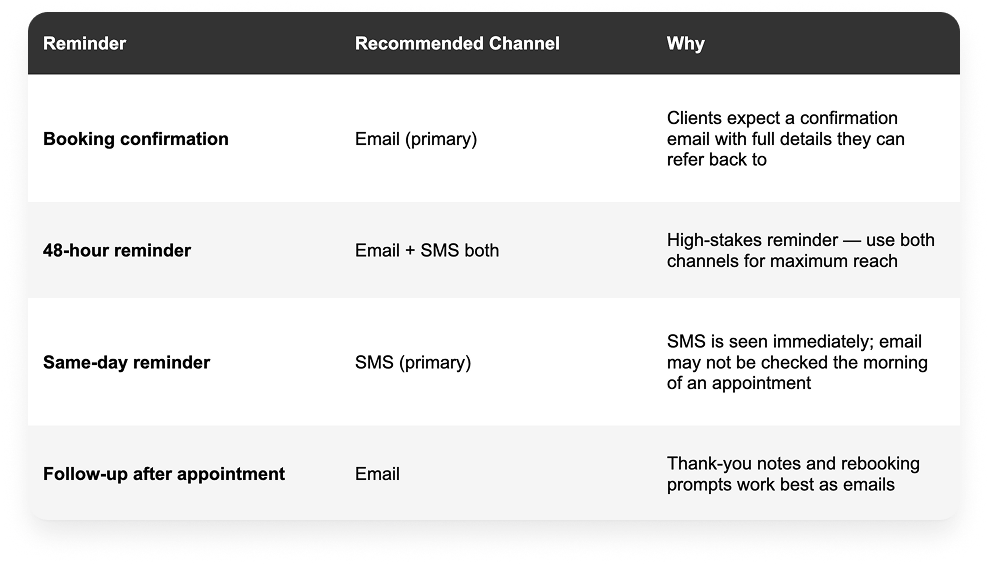
If you are limited to one channel — either because your booking platform only supports email or you do not have client phone numbers — prioritize email for the confirmation and 48-hour reminder. The same-day SMS has the highest per-message impact, but a well-timed email still significantly outperforms no reminder at all.
The Deposit Multiplier: Combining Reminders With Prepayment
Reminders are powerful on their own. But when combined with upfront payment or deposit collection, the no-show prevention effect is significantly amplified.
The reason is straightforward: when a client has already paid for their appointment — or paid a meaningful deposit — the psychological cost of not showing up increases dramatically. A client who has paid $100 upfront has a strong incentive to either attend or cancel in advance so they can reschedule and preserve their payment. A client who has paid nothing has almost no financial incentive to follow through.
How to Implement This
The cleanest implementation is a booking platform that handles both the scheduling and the payment in a single flow. When a client books, they pay — either the full session fee or a defined deposit percentage. The booking is only confirmed when payment clears. Reminders then go out automatically in the sequence described above.
Book Like A Boss is designed specifically for this model. When you configure your services in BLAB, you can require full payment or a percentage deposit at the time of booking. Clients cannot complete the booking without paying, and reminders go out automatically afterward. The combination of prepayment and automated reminders is the most effective no-show prevention system available for appointment-based service businesses.
What to Charge as a Deposit
There is no universal answer, but common deposit structures for service providers include:
- 25 to 50 percent of the session fee for longer or higher-value appointments
- 100 percent upfront for short sessions, consultations, or any appointment where the service is delivered entirely in the slot
- A fixed dollar amount that covers at least the cost of the time slot if the client does not show
The key is that the deposit is meaningful enough to create genuine financial commitment from the client — but not so high that it creates excessive friction in the booking process. For most service providers, a 50 percent deposit strikes this balance well.
Your Cancellation Policy: The Rules That Make Reminders Work
A reminder system is most effective when paired with a clear, enforced cancellation policy. Without one, clients who receive your reminder and realize they cannot attend will simply not show up — because they know there is no consequence for doing so.
A cancellation policy creates a structure that protects your time and income while giving clients a clear, fair set of rules to operate within.
What Your Cancellation Policy Should Include
- A minimum notice window: How far in advance must a client cancel to receive a refund? Common windows are 24 hours, 48 hours, or 72 hours. Shorter windows favor client flexibility; longer windows better protect your income.
- What happens to the deposit on late cancellation: Clearly state that deposits are non-refundable if the client cancels within the notice window. This is the core financial protection.
- Rescheduling options: Offer clients the ability to reschedule rather than cancel — this preserves the relationship and keeps the revenue in your pipeline. You can allow one rescheduling without penalty within the notice window.
- No-show policy: A client who simply does not appear forfeits their deposit or full payment. State this clearly.
Where to Put Your Policy
- In the service description on your booking page — before clients book
- In the booking confirmation email they receive immediately after booking
- In any contract or agreement they sign as part of onboarding
The goal is for clients to have read and acknowledged the policy before they ever receive a reminder. When the reminder arrives, it is reinforcing something they already knew — not surprising them with new information.
Setting Up Reminders: Step by Step
Here is a practical walkthrough for setting up your automated reminder system using a booking platform:
Step 1: Choose a Booking Platform That Supports Automated Reminders
Not all booking tools are equal on this front. Look for a platform that supports: customizable email reminders, SMS reminders, multiple reminder timing options, and the ability to include dynamic information like the client's name, service type, and appointment details. Book Like A Boss supports all of these.
Step 2: Configure Your Reminder Sequence
In your booking platform settings, set up the three-touch sequence: immediate confirmation, 48-hour reminder, and same-day reminder. For each one, configure:
- When it sends (immediately, 48 hours before, 2 hours before)
- Which channel it uses (email, SMS, or both)
- What it says — personalize with the client's name, service name, and appointment details
- Whether it includes a rescheduling link
Step 3: Add Payment Collection to Your Booking Flow
If you are not already collecting payment at the time of booking, configure your platform to require a deposit or full payment before confirming the appointment. In Book Like A Boss, this is done in the service settings — you can set the payment amount as a fixed sum or a percentage of the service fee.
Step 4: Write Your Cancellation Policy Into the Booking Page
Add your cancellation policy to your service description or booking page so clients see it before they book. Keep it clear and direct: the notice window, what happens to the deposit, and what the no-show policy is.
Step 5: Test the Full Flow
Before going live, book a test appointment with yourself to verify that confirmation and reminder emails arrive correctly, that the payment flow works, and that the cancellation/rescheduling link in your reminders functions properly. Fix any issues before clients see them.
Step 6: Monitor and Adjust
After running your reminder system for a month, review your no-show data. If no-shows are still high despite reminders, consider adding SMS to your 48-hour reminder, tightening your cancellation window, or increasing the required deposit amount. If you are seeing clients cancel frequently at the last minute, your cancellation policy may need adjustment.
Beyond Reminders: The Post-Appointment Follow-Up
The reminder sequence ends with the appointment — but the follow-up sequence begins there. A post-appointment message serves several purposes:
- It thanks the client and reinforces the professional experience: A warm, personal follow-up after a session makes clients feel valued and increases the likelihood they will rebook and refer others.
- It prompts rebooking while the appointment is fresh: The best time to get a client to book their next session is immediately after a positive one. A follow-up email that includes a direct booking link makes rebooking frictionless.
- It is an opportunity to gather feedback: A simple one-question feedback request — 'How was your experience today?' — gives you valuable information and signals to the client that you care about continuous improvement.
Post-Appointment Follow-Up — Same day or next day — Email
Hi [Name], thank you for your session today — it was great working with you. I hope you found it valuable. When you're ready to book your next appointment, you can do so here: [booking link]. I'd also love to hear any feedback you have. See you next time!
What a 50% Reduction in No-Shows Actually Means for Your Income
The headline number — cutting no-shows by 50 percent — is achievable for most service providers who implement the full system described in this article: automated reminders, upfront payment, and a clear cancellation policy. Let us put that in concrete terms.
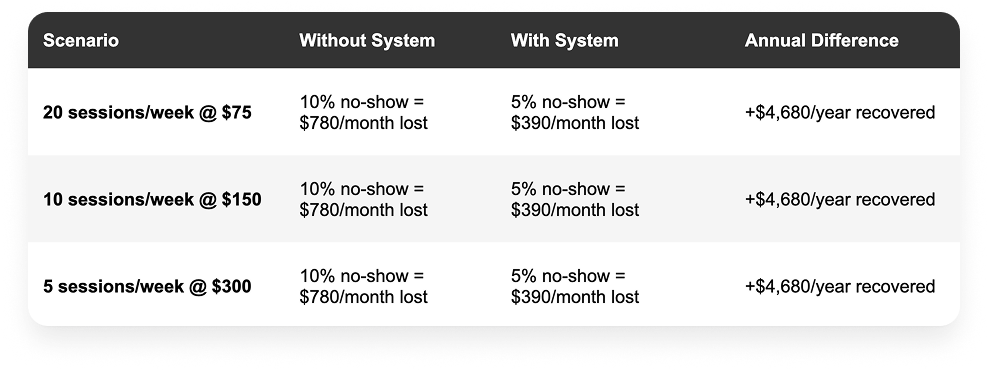
The math is the same regardless of your rate — what varies is the per-session cost of each no-show. At higher rates, every no-show is more expensive, and the value of preventing it is proportionally greater. A consultant charging $500 per session who prevents just two no-shows per month recovers $1,000 monthly — more than enough to justify any booking platform subscription.
The system described in this article — automated three-touch reminders, upfront payment or deposit, and a clear cancellation policy — can be fully configured in an afternoon. The ongoing time investment is essentially zero. The revenue protection is immediate and permanent.
Frequently Asked Questions
What is the best way to reduce no-shows for appointments?
The most effective combination is automated reminders plus upfront payment collection. Reminders address the forgetting problem — the most common cause of no-shows. Upfront payment or deposits address the low-commitment problem by giving clients a financial reason to show up or cancel in advance. Together, they address the two dominant causes of no-shows and can cut rates by 50 percent or more.
How many reminders should I send before an appointment?
Three is the optimal number for most service providers: an immediate booking confirmation, a 48-hour advance reminder, and a same-day reminder sent 1 to 2 hours before. More than three becomes intrusive. Fewer than three leaves gaps in the forgetting curve where clients can lose track of their appointment.
Should appointment reminders be sent by email or text?
Both, where possible. Email is better for the booking confirmation because clients expect a detailed confirmation they can save. SMS is more effective for same-day reminders because it is seen immediately and does not require opening an email client. The 48-hour reminder benefits from both channels to maximize reach.
Can I automate appointment reminders without a booking platform?
Technically yes — tools like Zapier can connect a calendar to an SMS or email service to trigger reminders automatically. But this requires technical setup and ongoing maintenance. A booking platform that handles reminders natively is far simpler, more reliable, and usually more affordable than building a custom automation. Book Like A Boss handles automated email and SMS reminders out of the box.
Should I charge a cancellation fee for no-shows?
Yes, and the most effective way to do this is to collect payment or a deposit upfront and make it non-refundable for late cancellations and no-shows. Charging a fee after the fact — sending an invoice to a client who already did not show up — is awkward, unlikely to be paid, and damages the relationship. A pre-collected deposit that is forfeited on a no-show is cleaner, fairer, and more effective.
What should my cancellation policy say?
At minimum: the advance notice required to cancel or reschedule without penalty (typically 24 to 48 hours), what happens to the deposit or payment if the policy is not followed (forfeited), and whether rescheduling is offered as an alternative to outright cancellation. State the policy clearly before clients book and include it in your booking confirmation.