.webp)
The Problem With Monthly Invoicing
If you have recurring clients — clients who pay you monthly for ongoing services — you are probably familiar with the monthly billing cycle: send the invoice, wait, send a reminder if needed, wait again, receive payment at some point that may or may not align with when you expected it. Every month, the same loop.
Manual monthly invoicing has a real cost. There is the administrative time of generating and sending invoices. There is the cash flow uncertainty of not knowing exactly when each payment will arrive. There is the cognitive overhead of tracking which clients have paid and which have not. And there is the awkward dynamic of requesting payment from a client you are actively working with — a dynamic that subtly colors the professional relationship every time it occurs.
Automatic payment collection solves all of these at once. The client's payment method is charged on a defined date each month without any invoice, any reminder, or any action from either party. Revenue arrives predictably. Administration drops to near zero. The payment relationship becomes invisible — which is exactly how it should be in a healthy ongoing client engagement.
This article covers everything you need to set up automatic recurring billing as a freelancer or service provider: the different approaches available, the tools that implement each, the conversation to have with clients when transitioning, and how to handle the edge cases that arise.
Three Models for Automatic Recurring Payment
Model 1: Session-Based Automatic Billing (Pay per Appointment)
The simplest form: payment is collected automatically each time a client books a session. No monthly invoice, no separate billing cycle — the payment processes at the point of booking. This is the model Book Like A Boss implements natively.
For clients who book regularly but variably — sometimes weekly, sometimes fortnightly — this model is the most natural. Each booking generates its own payment, and the total monthly revenue varies based on booking frequency. There is no end-of-month billing event because every appointment is already paid.
For appointment-based service providers, configuring Book Like A Boss to require payment at booking effectively creates automatic collection for every session without any separate billing infrastructure. This is the simplest and most friction-free model for session-based services.
Model 2: Monthly Flat-Rate Billing (Retainer)
A fixed amount charged automatically on the same date each month, regardless of the exact number of sessions in that month. The client pays a retainer fee that covers a defined scope — typically a set number of sessions per month plus any between-session support or deliverables.
This is the model to implement when you want maximum income predictability. The monthly amount is fixed, the charge date is fixed, and the revenue is entirely predictable without any invoicing action. The client's card is charged automatically; they receive a receipt; you receive the funds.
Model 3: Package Billing (Upfront or Installments)
For clients purchasing a package of sessions or a project delivered over time, payment can be structured as a single upfront charge or as automatic installments — for example, three equal monthly payments for a six-session package.
Installment billing provides clients with a lower upfront commitment while giving you the security of committed revenue across multiple months. Each installment charges automatically on the defined schedule without any manual action.
The Best Tools for Automatic Recurring Billing
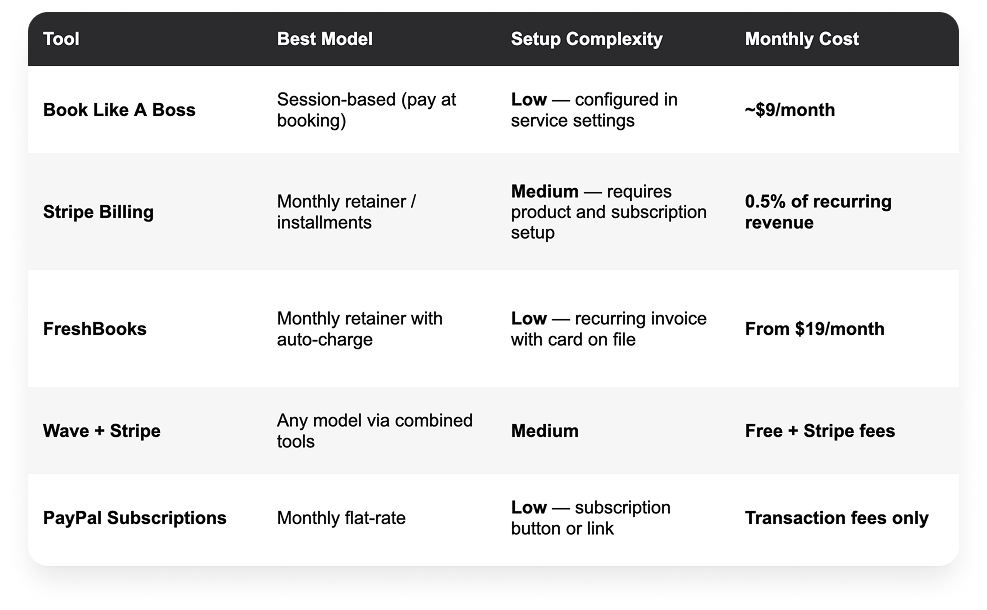
Book Like A Boss: Automatic Collection at Booking
For session-based services, BLAB is the cleanest implementation. Configure your service to require payment at booking, and every session the client books is automatically paid at the moment of scheduling. There is no separate billing date, no invoice, and no manual action. The client's card is charged when they book; you receive confirmation.
For package arrangements, BLAB supports upfront package pricing — the client pays the full package amount when they purchase, and sessions are drawn down from the package as they book.
Stripe Billing: The Most Flexible Recurring Infrastructure
Stripe Billing is the most powerful tool for recurring payment automation and is used by businesses of every size for subscription and retainer billing. The setup is more involved than consumer-focused tools but the capabilities are unmatched: flexible billing cycles, smart retry logic for failed payments, automated dunning (payment recovery), proration for mid-cycle changes, and a customer portal where clients can update their payment method independently.
For a freelancer setting up a straightforward monthly retainer, Stripe's setup involves: creating a product, setting a price with a recurring billing interval, and sending the client a subscription link or checkout page. Once the client completes the initial setup, all future charges happen automatically.
FreshBooks: Recurring Invoices With Auto-Charge
FreshBooks allows you to set up a recurring invoice for a client and store their card on file for automatic charging. The invoice is generated automatically on the defined schedule and the client's card is charged without any action from either party. This is the most accessible recurring billing option for freelancers already using FreshBooks for invoicing.
Setting Up Automatic Billing: Step by Step
The exact steps depend on the tool you choose, but the general process follows the same sequence:
STEP 1: Define Your Recurring Offer
Before configuring any tool, be clear on exactly what the recurring arrangement covers: the monthly fee, the number of sessions or scope included, and the billing date. Document this in your service agreement before the client's card is ever charged.
STEP 2: Choose Your Billing Tool
For session-based work: Book Like A Boss with payment required at booking. For flat monthly retainers: Stripe Billing, FreshBooks with card on file, or BLAB's recurring booking configuration. For installment packages: Stripe Billing.
STEP 3: Collect the Client's Payment Details
For tools that store a card on file (Stripe, FreshBooks), you will need to collect the client's card details before the first charge. Most tools provide a secure payment setup page or checkout flow that handles this without you ever seeing the raw card information. Send the client the payment setup link and confirm when their card is on file.
STEP 4: Configure the Billing Schedule
Set the billing date (the same date each month — the 1st is most common), the amount, and any automatic receipts or notifications. Configure what happens on payment failure — most tools send the client an automatic notification and retry the charge after a defined period.
STEP 5: Send the Client a Confirmation
Once recurring billing is configured, send the client a brief confirmation email: the amount they will be charged, the date the charge will occur, and how to update their payment details if needed. This removes any surprise from the first automatic charge and sets a professional, transparent tone.
STEP 6: Test the First Charge
After the first automatic charge processes successfully, confirm receipt and send a brief note to the client acknowledging the month ahead. This is good practice for the first billing cycle and reassuring for clients new to automatic billing arrangements.
The Client Conversation: Transitioning to Automatic Billing
For freelancers moving existing clients from manual monthly invoicing to automatic billing, a brief, confident explanation is all that is needed. Most clients welcome the simplification.
'For the convenience of both of us, I am moving to automatic billing from next month. On the 1st of each month, your card will be charged $[amount] automatically — no invoice to action on your end. I will send you a receipt confirming each charge. To set this up, I just need you to complete this short payment authorization: [link]. Let me know if you have any questions.'
Frame it as a convenience improvement rather than a policy change. Most clients actively prefer not having to action a monthly invoice — automatic billing removes a task from their plate as much as yours.
Handling Failed Payments
Automatic billing occasionally fails — expired cards, insufficient funds, or bank security holds are the most common causes. How you handle failed payments determines whether they become a minor administrative event or a client relationship issue.
Automated Retry Logic
Both Stripe Billing and FreshBooks have configurable retry logic: if a charge fails, the system automatically retries after a defined period (typically 3, 7, and 14 days). This resolves the majority of payment failures without any manual intervention — many failures are due to temporary issues that resolve on the next attempt.
Client Notification
Most tools send the client an automatic notification when a payment fails, prompting them to update their payment method. Ensure these notifications are configured — clients who do not know a payment failed cannot fix it.
Your Follow-Up
If automatic retries are exhausted and the payment remains unresolved, a brief, non-accusatory email is appropriate:
'Hi [Name], I wanted to flag that we have had a couple of unsuccessful attempts to process your monthly payment of $[amount]. This sometimes happens when cards expire or details change. Please update your payment method here: [link] and let me know if you have any questions.'
Keep the tone matter-of-fact. Most payment failures are administrative, not intentional. A warm, direct message resolves the majority of cases within 24 hours.
Frequently Asked Questions
What is the easiest way to set up recurring billing as a freelancer?
For session-based service providers, Book Like A Boss with payment required at booking is the simplest approach — every session the client books is automatically paid at the point of scheduling, with no separate billing infrastructure needed. For monthly retainer billing, FreshBooks with a card on file and recurring invoice is the most accessible option for freelancers who want a straightforward setup without technical complexity.
Can I charge clients automatically without a subscription service?
For session-based work, yes — a booking platform that requires payment at booking handles this without any subscription billing infrastructure. For retainer arrangements, you need some form of recurring billing tool (Stripe, FreshBooks, or similar) that stores the client's payment details and charges them automatically on a schedule.
How do I handle clients who prefer to pay by invoice?
Some clients — particularly larger businesses — require formal invoices for internal accounting purposes and cannot be put on automatic billing. For these clients, maintain your standard invoicing process. Where possible, request that they pay within 7 days and set up automatic invoice reminders. The goal is to move as many clients as practical to automatic billing while accommodating the minority who have genuine invoice requirements.
What happens to my recurring billing if a client wants to pause?
Define your pause policy in your service agreement before the situation arises. A common approach: one pause of up to one month per 12-month engagement is permitted with 14 days notice. For Stripe subscriptions, pausing is straightforward — the subscription can be paused and reactivated without losing the client's payment details. For FreshBooks recurring invoices, the recurring schedule can be paused manually.
Is automatic billing appropriate for all types of freelance services?
Automatic billing at a fixed monthly rate is most appropriate for services with a consistent, predictable scope: retainers, subscription arrangements, and monthly packages. It is less appropriate for project-based work with variable scope, hourly billing where the monthly total varies, or one-off engagements. For variable-scope work, a hybrid approach — automatic billing for a base retainer plus manual invoicing for variable additional work — is common.