The Free Tool Temptation
When you are starting out as a freelancer or running a lean service business, free software is genuinely appealing. Why pay for a booking tool when there are free options available? The logic makes sense on the surface — and for some freelancers in some situations, a free tool really is the right answer.
But free booking software comes with trade-offs that are not always obvious upfront. Limitations in features, branding, payment collection, and reminder capabilities can cost you more in lost revenue and wasted time than a paid subscription would have. The question is not simply 'is there a free option?' but rather 'does the free option actually do what my business needs?'
This article gives you a clear-eyed comparison of free and paid booking tools for freelancers and service providers — what free tools do well, where they fall short, and the specific features that justify the cost of a paid platform. By the end, you will have a concrete framework for deciding which tier makes sense for your business right now.
What Free Booking Tools Typically Offer
Free tiers of booking software are not worthless. For freelancers with very simple scheduling needs, they can be a legitimate starting point. Here is what you generally get on a free plan:
- A shareable scheduling link clients can use to book time with you
- Basic calendar integration with Google Calendar or Outlook
- Automated booking confirmation emails
- One or a very limited number of event or service types
- Standard availability settings — days, hours, buffer times
That is a meaningful foundation. For a freelancer who just needs a cleaner alternative to email scheduling — and who does not charge per session or require payment at booking — a free tool can handle the job adequately.
The problems emerge when your business needs go beyond the basics. And for most service providers who charge for their time, they do.
Where Free Tools Fall Short
The limitations of free booking software tend to cluster around the same five areas. Understanding them helps you assess whether a free tool is genuinely sufficient for your situation or whether its limitations are actively costing you money.
1. No Payment Collection
The majority of free booking tools do not support payment collection. This means that even if a client successfully books an appointment, you still need to invoice them afterward — and then hope they pay. For service providers who charge per session, this is a significant gap. It reintroduces the invoice chasing problem that a booking tool should be helping you eliminate.
Some tools offer payment as a paid-only feature. Others do not support it at all. If collecting payment at the time of booking is important to your business — and for most appointment-based service providers it should be — a free tool will not get you there.
2. Limited or No Branding
Free tiers almost universally include the booking platform's branding on your booking page — their logo, their color scheme, their domain name in the URL. For some freelancers this is acceptable. For those who have invested in building a professional brand, sending clients to a generic booking page with another company's name on it undercuts that effort.
The booking page is often a client's first interaction with your business. A page that looks like yours builds confidence. A page that looks like a free tool's template does the opposite.
3. No SMS Reminders
Email reminders are standard on most free tiers. SMS reminders — which have significantly higher open and response rates — are almost universally a paid feature. Given that SMS is the most effective channel for same-day appointment reminders, this limitation has a direct impact on your no-show rate.
4. Restricted Number of Service Types
Free plans typically limit you to one or a small number of event types or service listings. If you offer multiple services — a discovery call, a single session, a package, a group workshop — you may hit this limit quickly and find yourself managing multiple tools or routing clients to different systems for different services.
5. No Deposit or Cancellation Policy Enforcement
Free tools generally do not support deposit collection or automated enforcement of cancellation policies. This means clients can book and cancel freely with no financial consequence — contributing directly to no-shows and last-minute cancellations that cost you revenue.
The True Cost of a Free Tool
Free software is not truly free — it has a cost measured in the revenue it does not help you capture and the time it does not save you. Consider a concrete example:
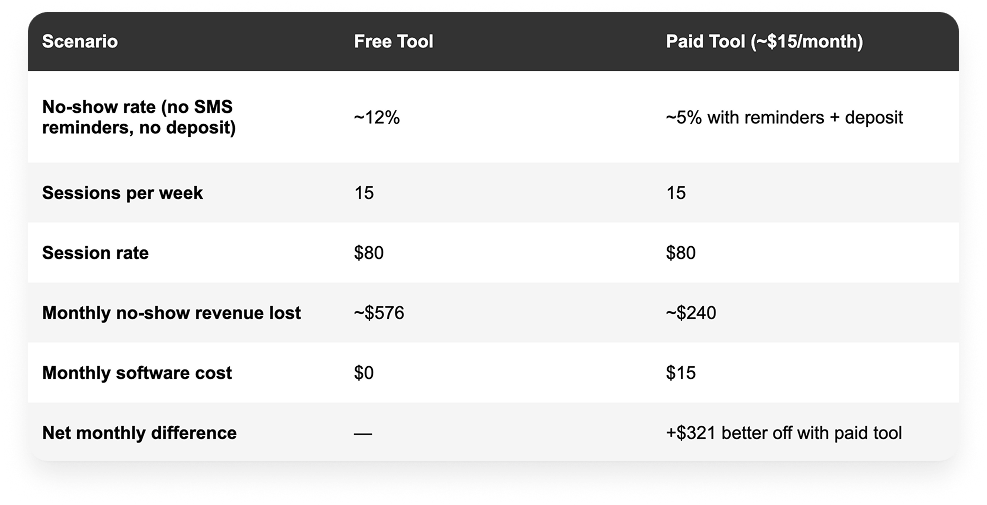
In this scenario — which is realistic for a moderately busy service provider — the paid tool pays for itself more than 20 times over every month through reduced no-shows alone. This does not account for the additional time saved on manual follow-up, invoice chasing, and scheduling coordination.
The calculation will differ for every freelancer depending on their session rate, volume, and current no-show rate. But the principle holds: for service providers who charge for appointments, the features that free tools withhold are often the most financially valuable ones.
The Free Tools: An Honest Assessment
Calendly Free
Calendly's free tier is one of the most widely used booking tools in the world, and for good reason. It is clean, fast to set up, and produces a professional scheduling link immediately. The limitation is stark: one event type only. If you offer more than one kind of appointment, you need a paid plan. Payment collection is also not available on the free tier.
Verdict: A good starting point for freelancers who only need to share availability for one type of meeting and do not require payment collection.
Best for: Consultants or professionals who need a simple scheduling link for a single meeting type — discovery calls, consultations.
Key limitation: One event type only. No payment collection. No SMS reminders. No deposit protection.
Square Appointments Free
Square Appointments offers a genuinely functional free tier for solo service providers. The catch is the pricing model: rather than a monthly fee, Square takes a percentage of every transaction processed through the platform. For low-volume businesses or those with high per-session rates, the transaction fees can add up to more than a flat monthly subscription would cost.
Verdict: Free in terms of monthly subscription, but transaction fees apply on every payment. Best for in-person service businesses already using Square's POS ecosystem.
Best for: Barbers, salon owners, and in-person service providers who want booking integrated with a point-of-sale system.
Key limitation: Transaction fees on every payment. Less suitable for online or remote service businesses. Basic booking page customization.
Notion / Google Calendar (DIY)
Some freelancers piece together a free booking system using Google Calendar's appointment scheduling feature combined with a Notion page for service descriptions. This works at a basic level but requires manual effort for payment collection, reminders, and anything beyond simple availability sharing. It is a starting point, not a professional system.
DIY (Google Calendar + Notion)
Verdict: Free but time-intensive. Requires manual payment collection, reminders, and client management. Not scalable beyond the simplest use cases.
Best for: Freelancers in their very first weeks who need something functional immediately and plan to upgrade once they have their first few paying clients.
Key limitation: No integrated payments. No automated reminders. No branded booking page. Significant manual overhead.
What Paid Tools Actually Give You
Paid booking tools are not simply free tools with a price tag. The features unlocked at paid tiers address the specific gaps that cost free-tier users revenue and time. Here is what you get for the typical $9 to $30 per month that a quality paid booking tool costs:
- Payment collection at the time of booking: Clients pay when they book — full payment or a deposit. No invoice required. No chasing required. This single feature typically recovers the cost of the subscription many times over.
- Unlimited service types: List every service you offer, with individual pricing, duration, and availability settings for each. One booking page that handles your entire service menu.
- SMS and email reminders: Automated multi-touch reminder sequences that reduce no-shows without any ongoing manual effort.
- Fully branded booking pages: Your logo, your colors, your domain. No third-party branding undermining the professional experience you have built.
- Cancellation policies and deposit enforcement: Clients who cancel late forfeit their deposit automatically. No awkward conversations required.
- Client intake forms: Collect information from clients before the appointment — goals, relevant history, preferences — so the session starts immediately rather than spending time gathering basics.
- Analytics and booking history: Track which services are most popular, peak booking times, and revenue over time.
Book Like A Boss: The Paid Tool Built for Service Providers
Among paid booking tools, Book Like A Boss stands out for freelancers and service providers specifically because it goes beyond scheduling to function as a complete service showcase and booking platform. The distinction matters: most booking tools give you a scheduling widget. BLAB gives you a fully branded page that presents your services, social proof, and booking flow in a single professional experience.
What Sets It Apart From Other Paid Tools
- No transaction fees: BLAB charges no transaction fees on top of your payment processor's standard rates. Some paid competitors add their own percentage cut on top of Stripe or PayPal fees — BLAB does not.
- Booking page as a business asset: Your BLAB page can include your bio, service descriptions with pricing, client testimonials, photos, videos, FAQ section, and social media links — all alongside your booking calendar. Many freelancers use their BLAB page as their primary web presence.
- Multiple service types from one platform: Individual appointments, group sessions, packages, recurring bookings, and events — all manageable from the same platform with a 14-day free trial to test everything before committing.
For freelancers who charge per appointment, the combination of payment collection at booking, zero transaction fees, and automated reminders makes Book Like A Boss a straightforward financial decision. The platform typically pays for itself within the first prevented no-show of the month.
The Decision Framework: Free or Paid?
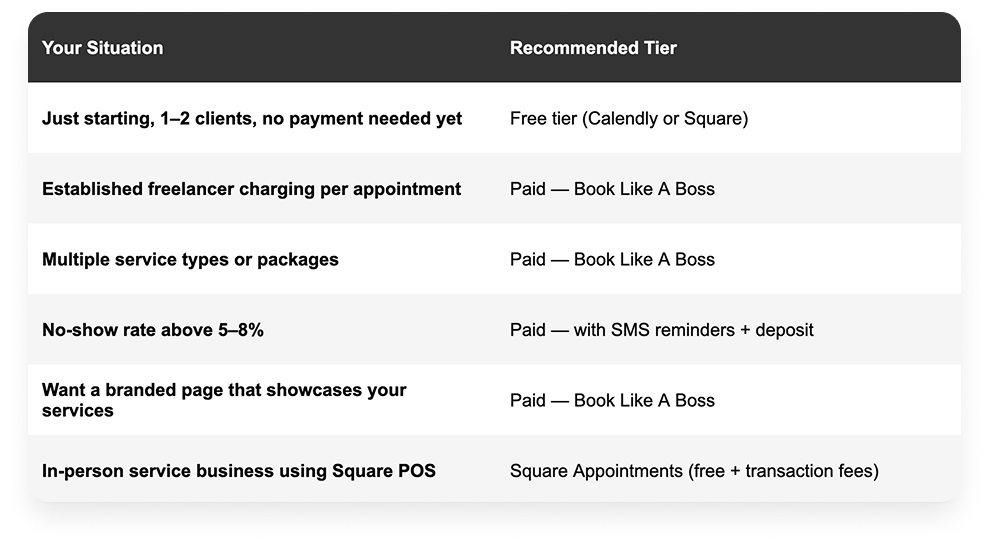
Use these questions to determine which tier is right for your business right now:
Do you charge clients per appointment or session? If yes, a paid tool that collects payment at booking is almost certainly worth it. The revenue protection from reduced no-shows and eliminated invoice chasing covers the cost immediately.
Do you offer more than one type of service or appointment? If yes, free tools that limit you to one event type will not accommodate your business. A paid plan is required.
Is your booking page something clients see before they decide to hire you? If your booking link is on your website, in your email signature, or on your social profiles, it is part of your brand. A generic free-tool booking page may not represent the professional standard you want to project.
Do you currently have a no-show problem? If clients regularly miss appointments without advance notice, SMS reminders and deposit collection — both paid features — are the solution. The revenue recovered from even one prevented no-show per month typically covers the subscription cost.
Are you just starting out with your first one or two clients? In this case, a free tool is a perfectly reasonable starting point. Use it to get your first bookings, then upgrade once you have consistent client volume and revenue to justify the investment.
Making the Upgrade: What to Do Before You Switch
If you are currently on a free tool and considering upgrading to a paid platform, a few steps make the transition smoother:
- Audit your current no-show rate: Track how many appointments in the last month were missed or cancelled last-minute. This gives you a concrete baseline to measure improvement against after upgrading.
- Calculate your lost revenue from no-shows: Multiply your no-show rate by your session fee and monthly session volume. This is the number the paid tool needs to beat — and in most cases, it will.
- Use the trial period: Book Like A Boss offers a 14-day free trial. Use it to build your full booking page, configure payment and reminder settings, and test the client experience before committing.
- Update your booking links everywhere: Once you switch platforms, update your booking link in your email signature, website, social profiles, and anywhere else it appears. Broken or outdated booking links are a common source of lost bookings during transitions.
Frequently Asked Questions
Is free booking software good enough for freelancers?
It depends on what your business needs. For freelancers who only need a scheduling link for a single appointment type and do not charge per session, a free tool can be adequate. For service providers who charge per appointment, need multiple service types, or want to reduce no-shows with payment collection and SMS reminders, free tools will not meet the need — and the missed revenue typically costs far more than a paid subscription.
What is the best free booking tool for freelancers?
Calendly's free tier is the most polished and widely recognized free scheduling option. It sets up quickly, integrates with major calendars, and produces a professional booking link immediately. The main limitation is the single event type restriction — once you need more than one service type or payment collection, the free tier becomes insufficient.
Do I need to pay for a booking tool if I only have a few clients?
Not necessarily at first. A free tool can handle scheduling for a handful of clients while you are getting started. The right time to upgrade is when you have consistent enough volume that no-shows are costing you real money, when you are ready to accept payment at booking, or when you want your booking page to represent your brand professionally.
What features are worth paying for in a booking tool?
The highest-value paid features for service providers are: payment collection at the time of booking, SMS appointment reminders, unlimited service types, branded booking pages without third-party logos, and deposit and cancellation policy enforcement. These features directly reduce no-shows, eliminate invoice chasing, and present a more professional client experience.
Does Book Like A Boss have a free plan?
Book Like A Boss offers a 14-day free trial that gives you full access to all features — no credit card required. This is more useful than a permanently limited free tier because it lets you experience the full platform before deciding whether to subscribe, rather than using a restricted version indefinitely. After the trial, paid plans start at approximately $9 per month.
Are there hidden costs in free booking tools?
Yes, though they are not always obvious. Square Appointments' free tier charges transaction fees on every payment processed. Some tools that appear free charge for SMS reminders, additional users, or removing their branding. The less obvious cost is the revenue lost to higher no-show rates when you lack deposit collection and SMS reminders — which free tiers almost universally exclude. Calculate the full cost including lost revenue, not just the subscription fee.